SFP-to-TTL v1.3 Adapter
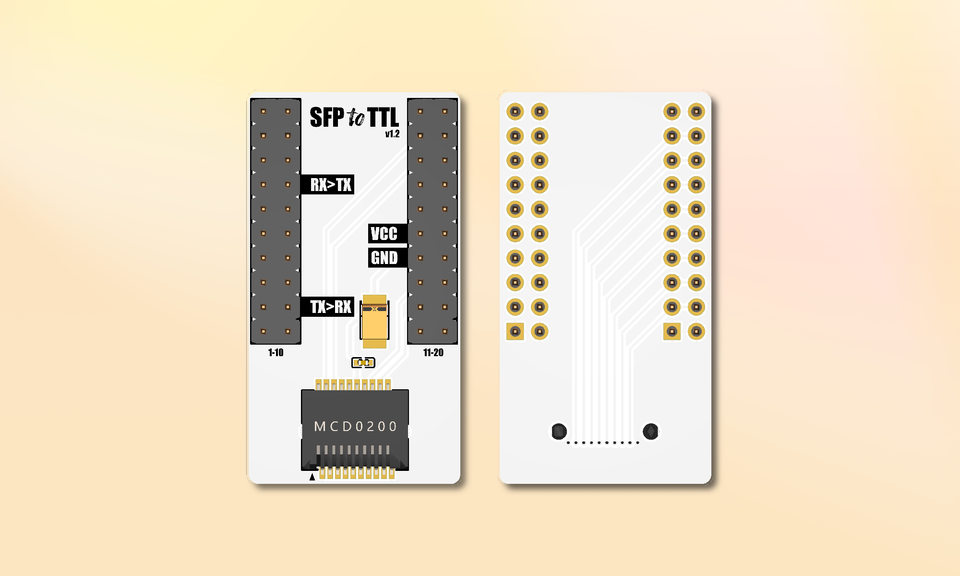
Breaks out a GPON stick’s 20 pins so you can flash firmware using a serial adapter. No soldering required 👍
Order
💶 Price: 19.90€ + shipping
✈️ Ships almost worldwide
🧭 Always ships with tracking number.
🧑💻 Each board is manually tested before shipping
Description
The SFP-to-TTL v1.3 is a compact adapter that exposes the 20 pins of a GPON SFP module connector to make the 3V UART lines (TX, RX, VCC, GND) accessible. Perfect for:
- flashing OpenWrt / Carlito / stock firmware
- debugging the bootloader
- grabbing serial logs without fiddly pogo-pins
Key features
| Feature | Detail |
|---|---|
| Version | v1.3 (white) |
| Exposed pins | 2x20 SFP connector pins (UART, I²C, GPIO, etc.) |
| Silkscreen | First pin of each row marked 1 and 11, following the SFP MSA pin numbering — the same numbering every pinout table and forum post uses — with VCC and GND called out |
| Quick start | QR code on the back of the board, marked GET STARTED: scan it for the step-by-step setup guide |
| SFP connector | SFP slot, direct module insertion |
| What's new in v1.3 |
|
| Earlier revisions | v1.2 added 2 capacitors for compatibility with low-cost USB-TTL adapters (no external supply needed), a ground plane, a wider VCC trace and SFP-compliant pin numbering |
| Power | 3.3V via VCC pin (from FTDI or external source) |
| Dimensions | 41.25 mm × 22.5 mm |
What customers say
“I finally got my SFP module working after trying several different firmwares for the (clone) Huawei module I bought. The adapter helped a lot — received in good order.”
“Everything worked well with the adapter. Flashing and console access on my Huawei MA5671A worked flawlessly on the first try. Thanks for your work!”
“Successfully resurrected my bricked stick without having to do any soldering. Thanks for your help!”
“It did its job perfectly! I managed to unbrick my XGS-ONU-25-20NI module. After long hours of tinkering and diagnostics, I finally got it working again. What a relief — thank you so much!”
“I ordered the SFP-to-TTL adapter and I highly recommend it. Shipped quickly and well packaged. I managed to unbrick 2 SFP modules ;D”
“I wanted to let you know that the package has arrived safely! The SFP-to-TTL boards are working perfectly. Thanks again for all your help!”
FAQ
How do I order?
- Use the Paypal form at the top of this page.
- Once payment received, the item will be shipped and a tracking number provided. Usually ships the next working day.
How much is shipping/handling?
Every board is tested and packed in foam bubble wrap and sent as a tracked letter, the tracking number is always included, which is better for you and for me 🙂
Orders ship from France with La Poste, or with Happy Post for destinations La Poste no longer covers; the carrier shown at checkout is a guide and may change at dispatch. The price is calculated automatically for your country, and includes customs handling where the destination requires it, any import duties or local taxes billed on arrival are still yours to pay. If your country isn't listed, contact me here and I'll quote it.
What else do I need?
- A USB-TTL 3.3V adapter and 4 female-female Dupont cables
- A USB cable for your computer
- A compatible SFP/ONU GPON module (FS.COM, Huawei MA5671A, etc...)
- A serial console app (screen, PuTTY, minicom, ...)
My module keeps rebooting
There's an article about this.
TL;DR, it's likely a serial adapter (USB-TTL) power supply issue.
Version 1.1 relied entirely on the quality of your USB-TTL adapter.
Version 1.2 and later include 2 capacitors to help prevent this issue.
Return Policy
I'm a small-batch maker and every adapter is carefully assembled and individually tested before shipping to guarantee it works as expected.
Because of the nature of this product and the fact that it’s intended for developers, I unfortunately cannot accept returns, exchanges, or refunds.
If you have any questions before ordering or need help using the adapter, feel free to reach out, I'm happy to assist you and make sure you get the right product for your needs.
Thank you for your understanding and support 🙏
Design note: this adapter is an independent improved redesign, inspired by an open-source SFP-to-TTL board shared on GPON Hack. Thanks to the original author and the GPON hacking community. Pinout & UART guide: gpon-sfp-serial-console.