Exposing a Local Service Online for Real-World Testing: the MCP Case with frp
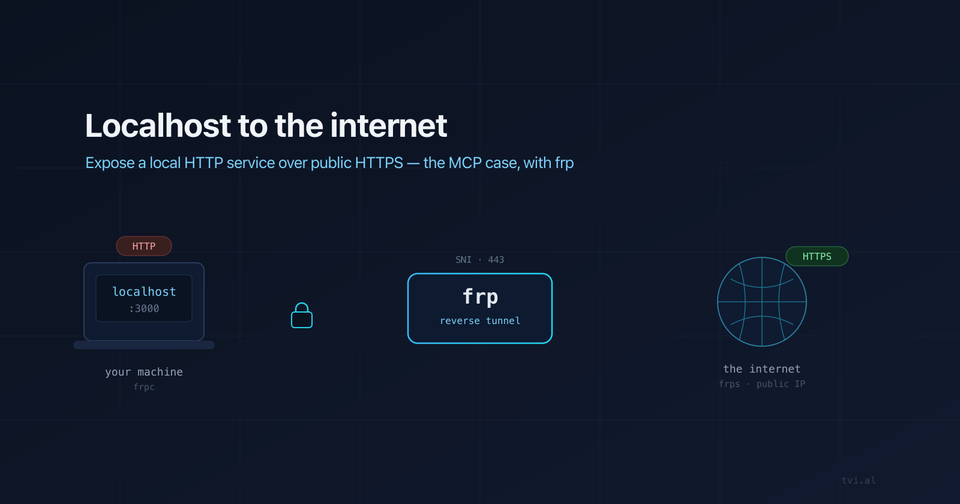
You built something on http://localhost:3000. It works on your machine. Then the real world asks a question you can't answer from localhost: can someone — or something — out there actually reach you, over HTTPS, right now?
This is the gap between "runs locally" and "runs in the conditions it will actually run in." I hit it head-on recently while building an MCP server: developed locally over plain HTTP, but to test it the way it would really be used, it had to be reachable on the public internet over HTTPS. I solved it with frp, a free, open-source, self-hosted alternative to ngrok. Here's the problem, when you run into it, and how frp fixes it.
The problem: localhost is an island
When you develop, your service lives at 127.0.0.1. That's perfect for a fast inner loop, but it's invisible to everything outside your laptop. The moment something external needs to talk to your service, localhost stops being enough. And often that external party adds two non-negotiable constraints:
- A public address. It has to be a real, routable URL, not
localhostand not your LAN IP behind a home router. - HTTPS. Most modern integrations flatly refuse plain HTTP. No valid TLS certificate, no conversation.
So you're stuck. Your code is fine. Your environment is wrong. You need a public HTTPS front door that points back to the HTTP service running on your machine — without deploying anything, and ideally without poking holes in your firewall.
When you actually need this
This isn't an exotic edge case. You hit it constantly once you integrate with anything outside your own code:
| Scenario | Why localhost fails |
|---|---|
| MCP servers | Remote MCP clients (Claude and others) connect to your server over the internet and expect HTTPS. A local HTTP endpoint is unreachable to them. |
| Webhooks | Stripe, GitHub, Twilio, Shopify… they all POST events to a public URL. They can't call back into your laptop. |
| OAuth redirect URIs | Many providers require an HTTPS callback URL and won't accept http://localhost for production-style flows. |
| Mobile app testing | A real phone on cellular data can't reach your dev server's LAN IP. |
| Sharing a work-in-progress demo | A client or teammate needs a link that works from their machine, now, without a deploy. |
| Third-party integrations that call you back | Any API that does server-to-server callbacks needs to find you on the open internet. |
The common thread: someone else's server needs to initiate a connection to your code. That's the inversion that breaks the usual "I'll just run it locally" workflow.
The MCP case in particular
MCP (the Model Context Protocol) makes this especially sharp. An MCP server exposes tools and resources to an AI client. When that client is hosted — say, a model reaching out from the cloud — it dials your server. During development that server is just a process on your machine speaking HTTP. To test it under real conditions you need exactly the three things localhost can't give you:
- a public endpoint the client can resolve and reach,
- served over HTTPS with a valid certificate,
- pointing back at the plain-HTTP process you're actively editing.
You don't want to deploy on every code change just to test a tool call. You want your local dev loop and a real public HTTPS URL at the same time. That's the job for a tunnel.
The landscape of solutions
There are several ways to bridge localhost to the internet:
| Tool | Trade-off |
|---|---|
| ngrok | Easiest to start. Free tier gives random URLs, rate limits, and a branded interstitial. Stable URLs and more cost money. |
| Cloudflare Tunnel | Solid and free, but ties you to Cloudflare and your domain living there. |
| Tailscale Funnel | Great if you're already in the Tailscale ecosystem. |
| frp (self-hosted) | Free, open source, no third party in the middle, your own domain and URLs. The cost is: you need a server with a public IP to run it. |
I went with frp (fatedier/frp, 100k+ stars on GitHub). It's mature, battle-tested, and — crucially — I own both ends. No rate limits, no random URLs, no dependency on a vendor's free tier deciding to change the rules. If you already have a small VPS or home server with a public address, frp turns it into your personal ngrok.
How frp works
frp is a reverse proxy built around one clever idea: the connection is established outbound, from your machine to your public server. That means your laptop never needs an inbound firewall hole or port forwarding — it dials out, like a browser does.
There are two pieces:
frps— the server, running on a host with a public IP. It listens for clients and for incoming visitor traffic.frpc— the client, running on the machine with the service you want to expose (your laptop). It opens a persistent control connection up tofrps.
The flow looks like this:
Visitor (internet, HTTPS)
        │
        ▼
   ┌─────────┐   public host with a real IP + TLS cert
   │  frps   │
   └────┬────┘
        │  persistent tunnel (initiated by the client, outbound)
        ▼
   ┌─────────┐   your laptop, behind NAT/firewall
   │  frpc   │
   └────┬────┘
        ▼
http://localhost:3000 ← your actual servicefrpcon your laptop connects up tofrpsand registers: "I want to expose my local port 3000 under this name."- A visitor hits your public HTTPS URL, which lands on
frps. frpsforwards that request down the established tunnel tofrpc.frpchands it tohttp://localhost:3000and relays the response back.
The visitor sees a clean public HTTPS endpoint. Your code keeps running on plain HTTP on localhost, completely unaware it's now reachable from the internet.
A minimal setup
On the public server, frps.toml:
bindPort = 7000              # control channel for clients
vhostHTTPSPort = 8443        # where HTTPS visitor traffic enters
auth.token = "a-long-random-secret"
On your laptop, frpc.toml:
serverAddr = "your-public-host.example.com"
serverPort = 7000
auth.token = "a-long-random-secret"

[[proxies]]
name = "my-mcp"
type = "https"
customDomains = ["tunnel.example.com"]
localPort = 3000             # your local HTTP service
Start the server once (frps -c frps.toml, ideally in Docker so it stays up), then run frpc -c frpc.toml whenever you want the tunnel live. Point tunnel.example.com at your public host's IP, terminate TLS there (or let frp handle it), and your localhost service is now a real HTTPS endpoint on the internet.
A nice trick: you can avoid opening any extra port by routing everything through 443 using SNI-based stream routing in your reverse proxy (nginx's stream module, for example). One public port, multiple tunneled services, no firewall surface beyond what you already expose for HTTPS.Things to watch out for
- Secure the control channel. Always set
auth.token. Without it, anyone who finds yourfrpscan register tunnels through your server. - Real client IPs. Once traffic passes through a proxy chain, your service may see the proxy's IP instead of the visitor's. If you have IP allow-lists or rate limits, use
proxy_protocol/real_ipso they keep working. - It's a dev/testing tool by default. A tunnel from your laptop is great for testing under real conditions. It is not a production deployment — when your laptop sleeps, the tunnel dies. For production, deploy the service properly.
- Don't expose more than you mean to. A tunnel makes your local service genuinely reachable by anyone with the URL. Treat it like the public endpoint it now is.
Final thoughts
The hardest bugs aren't always in the code — sometimes they're in the conditions. A service that works on localhost but has never been called by a real external client over HTTPS hasn't really been tested. Tunnels close that gap: they let you keep your fast local loop while exposing a genuine public HTTPS endpoint to whatever needs to reach you — a webhook sender, an OAuth provider, a phone on cellular, or a cloud-hosted MCP client.
ngrok is the quick way in. But if you have a server with a public IP and you'd rather not rent your own URLs back from a vendor, frp gives you the same capability, self-hosted, free, and entirely yours.
