Distorted Audio Over Optical? Your Clocks Disagree, Not Your Cable
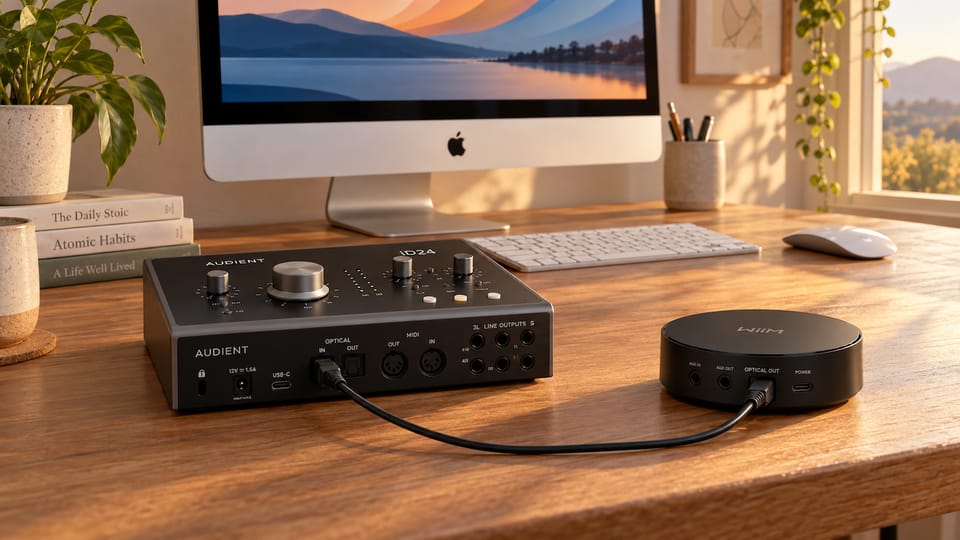
I run a WiiM Mini into an Audient iD24 over a plain TOSLink cable. Streamer on the network, optical out, interface on the desk, monitors on the interface. No DAC in the middle, no DSP, nothing clever. It should be the most boring signal path in the house.
Spotify sounded wrong. Not loud, not clipped, not crackling. Just wrong. Notes didn't sit where they should. The timbre of a piano was off in a way I could hear instantly but couldn't name. Turning the volume down changed nothing, which is the detail that matters: distortion that survives a volume cut is not a level problem.
Every search result wanted to sell me a better optical cable. The actual cause was that the three devices in that path had different opinions about how fast a second goes by.
Distorted is not the same as saturated
Worth separating these before anything else, because they send you down completely different paths.
Saturation is a level problem. Something in the chain is being asked to represent a number bigger than it can hold, so the peaks get flattened. It gets worse as you turn up and better as you turn down. It lives on transients and loud passages.
Distortion in the sense I had is a content problem. The samples arriving are fine, but they're being played back at the wrong rate, or with gaps where the receiver ran out of data and improvised. Pitch shifts. Harmonics land in the wrong place. And crucially it is present at every volume, because the damage happened before the volume control.
If turning the knob down cleans it up, read about gain staging. If it doesn't, read on.
What S/PDIF actually carries
Here is the thing that makes optical different from USB, and the reason this problem exists at all.
A USB audio interface is a slave to its host. Your Mac says "we are running at 48 kHz", the interface says "yes", and that's the end of the negotiation. The interface has a crystal, but it defers.
S/PDIF over TOSLink doesn't work like that. It is a self-clocking format: the receiver recovers the timing from the bitstream itself. There is no separate clock wire, and, this is the part people miss, there is no sample rate converter in the path. Nothing resamples anything for you. The receiver is simply expected to lock onto the transmitter's clock and follow it.
So when a device is fed S/PDIF, it has to be told to stop trusting its own crystal and start trusting the incoming stream. If you don't tell it, it keeps counting at its own speed while samples arrive at a different one, and you get exactly what I was hearing: a stream read at the wrong rate, with periodic glitches every time the buffers drift apart far enough to break.
Two clocks, one cable, nobody in charge. That's the bug.
The three settings that have to agree
The reason this took me a while is that the three settings live in three different applications, and only one of them gives you any feedback at all.
1. The source: what the WiiM is allowed to send
The WiiM Home app has an Optical Output Resolution screen that most people never open.
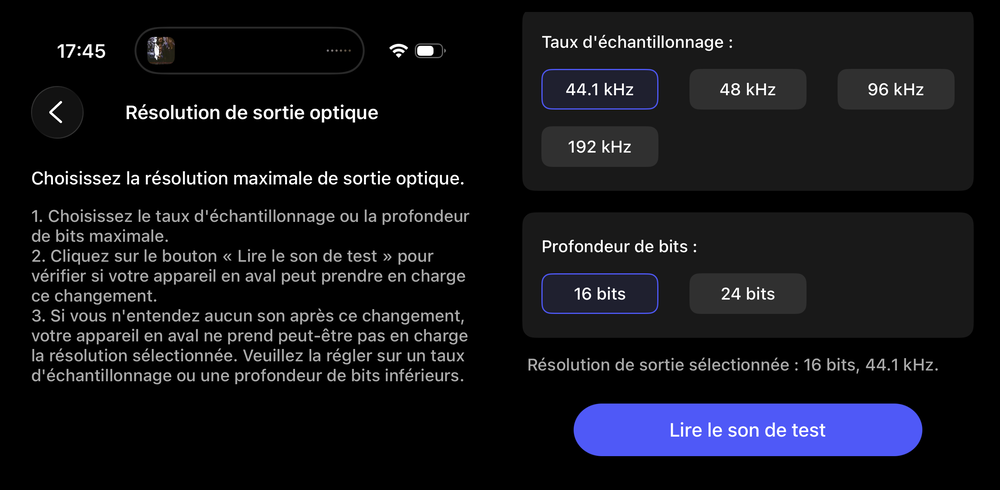
Two things to notice.
It offers 192 kHz, and the iD24 physically cannot accept it, because the whole interface tops out at 96 kHz. If you pick a rate your receiver can't handle, you don't get a warning, you get silence or garbage. That's what the "Play test sound" button is for, and it is genuinely the best diagnostic control on the whole chain: change a setting, press it, and you know within a second whether the downstream device survived.
I set it to 44.1 kHz / 16 bits. That is Spotify's native format: the Ogg Vorbis stream decodes to 44.1/16, and nothing you do downstream adds information that was never there. Choosing 48 or 96 kHz here doesn't "upgrade" anything, it just inserts a resampling step inside a small streamer. Set the ceiling to match what you actually play.
2. The interface: speak S/PDIF, follow the incoming clock
In Audient's iD Mixer, the System Panel is where the optical port gets configured.
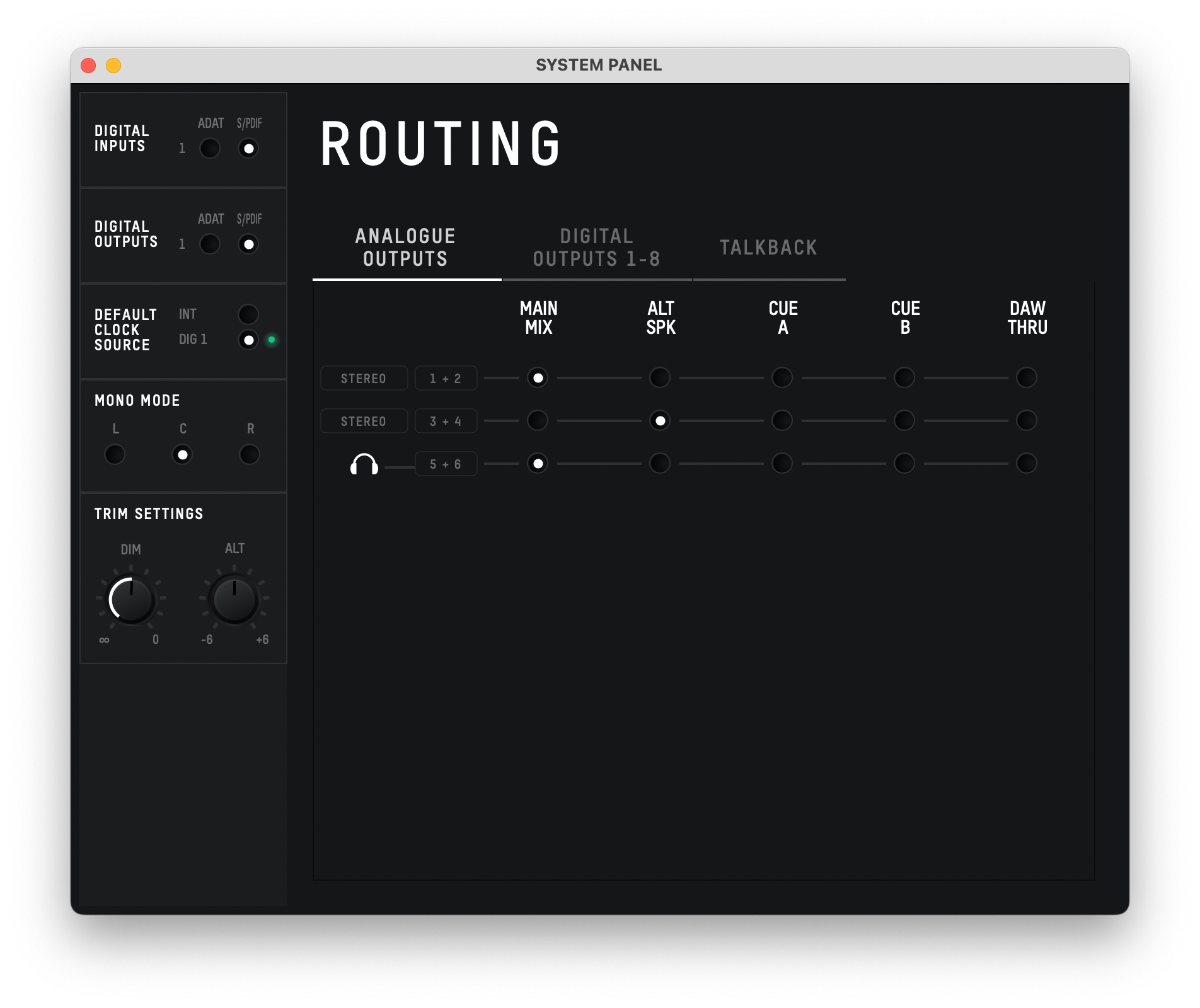
Two settings, both mandatory:
- Digital Inputs: S/PDIF, not ADAT. Same physical TOSLink connector, two completely different protocols. ADAT carries 8 channels and will make no sense of a 2-channel S/PDIF stream.
- Default Clock Source: DIG 1, not INT. This is the "stop trusting your own crystal" instruction.
That small green LED next to DIG 1 is the only lock indicator in the entire signal path. Lit means the iD24 has successfully recovered a clock from the optical input. If it's dark, the interface silently falls back to its internal clock and you are back to two clocks disagreeing.
3. The host: macOS has the final word
And this is the one I'd never have found by guessing, because it's in a utility most people only open to create an aggregate device.
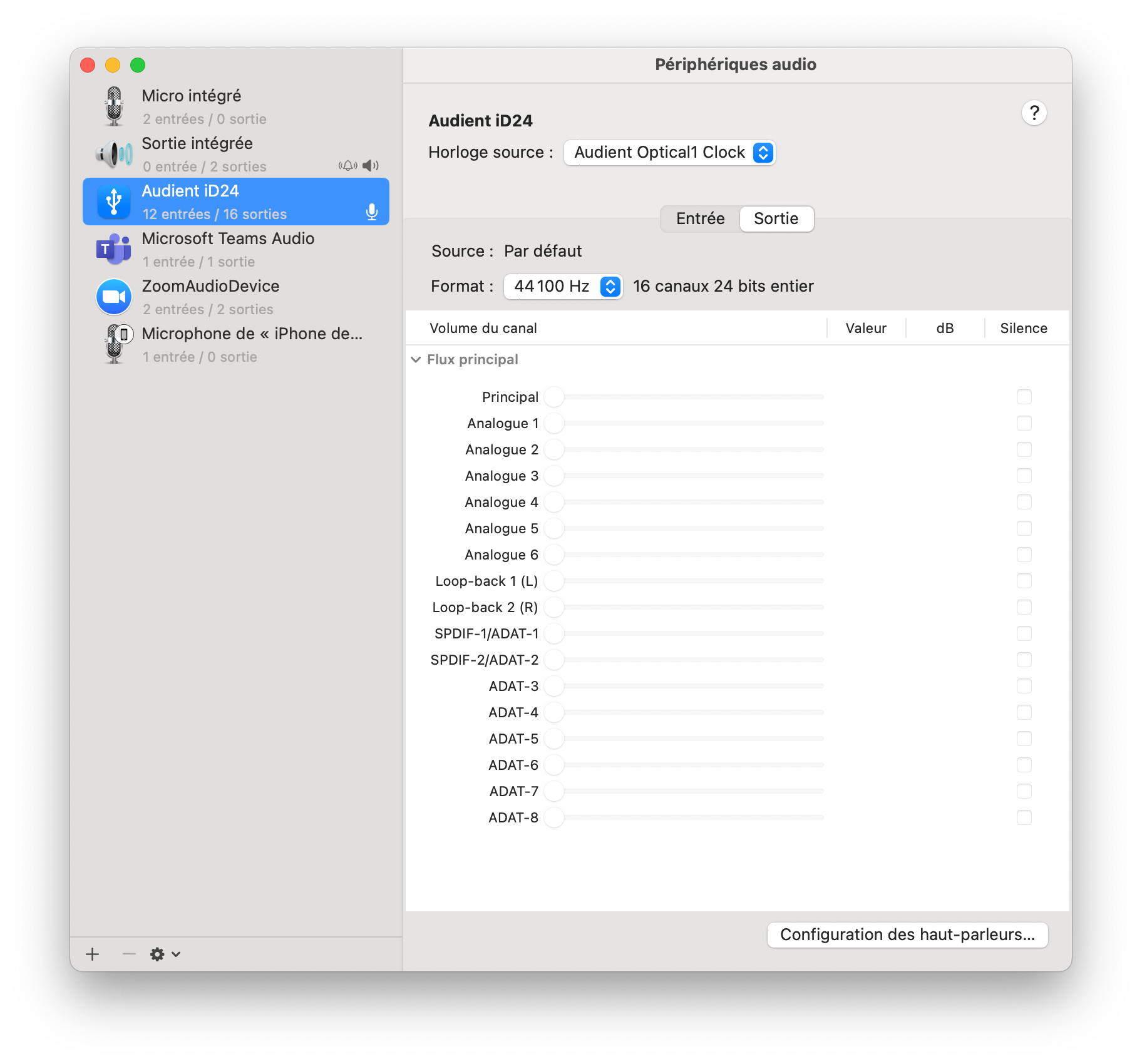
In Audio MIDI Setup, the iD24 exposes a Clock Source dropdown, which has to be set to Audient Optical1 Clock, and a Format field, which has to be set to 44100 Hz.
Remember that a USB interface is a slave to its host. Setting DIG 1 in iD Mixer is necessary but not sufficient. As long as macOS is still telling the interface to run at 48 kHz on its internal clock, that's what happens, no matter how the hardware's own control panel is configured. The interface obeys the computer, and the computer was the one getting it wrong.
Set those two fields and the chain finally tells one consistent story: the WiiM sends 44.1, the iD24 locks to it, and macOS knows that's what's going on.
The distortion disappeared completely.
Why there is no on-screen frequency anywhere
This setup is unusually hard to debug for a dumb reason: nothing displays the incoming sample rate. The iD24 has no screen. iD Mixer shows you the clock source and the lock LED, but not the frequency it locked to. Audio MIDI Setup shows you a frequency, but it's the one you chose, not the one arriving on the cable.
So the only way to verify is to make the two numbers you can see, the WiiM's output resolution and the macOS format field, identical, then confirm the green LED is lit. Three settings, one of which is a yes/no light, and that's your entire instrumentation.
The transferable version
Strip out the specific hardware and the rule is short enough to remember:
- Distortion that doesn't change with volume is a clock or rate problem, not a gain problem. Stop looking at cables and EQ.
- S/PDIF has no sample rate converter. The receiver must be explicitly told to lock to the incoming stream, and most devices default to their internal clock.
- A USB interface obeys its host. Whatever its own control panel says, the computer's audio settings win. Set both.
- Check the receiver's ceiling before raising the source. 192 kHz available at the source means nothing if the far end stops at 96.
- Match the source material. Spotify is 44.1/16. Resampling it on the way out adds a processing step and zero information.
And if your source has a "play test sound" button next to the resolution setting, use it after every change. One second of feedback beats twenty minutes of listening to a track trying to decide whether it sounds slightly better.
